App 介紹 230710
最後更新
紅色系企業樣板,以 PDRenderKit 1.2.0 的 :if/:path 依 ?page= 切換 7 頁,含部落格與 Markdown 文章。
概要
| 項目 | 內容 |
|---|---|
| 製作日期 | 2023-07-10 |
| 分類 | 商業網站範例 |
| HTML 檔案 | index.html, views/nav.html, views/header.html, views/section-3.html, views/section-4.html, views/section-5.html, views/section-6.html, views/section-7.html, views/section-8.html, views/section-9.html, views/section-blog.html, views/section-article.html, views/section-contact.html, views/footer.html |
| 原始碼 | target/20230710 |
預覽
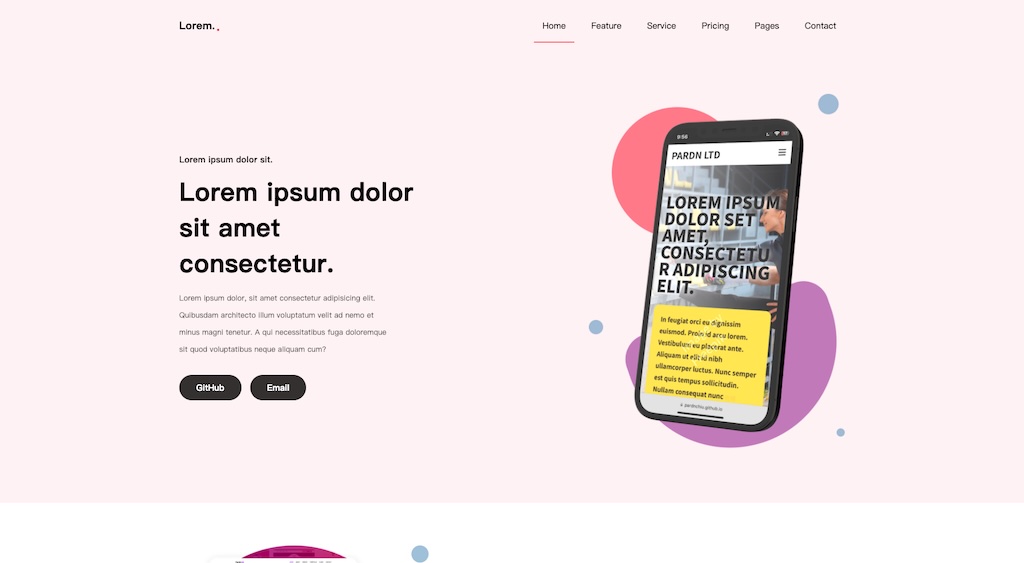
在新分頁開啟範例
頁面區塊
| 區塊 | 說明 |
|---|---|
| 導覽列(views/nav.html) | sticky 導覽列,連結 ?page=home/feature/service/pricing、Pages 下拉(Blog、Article)與 Contact;以 :index="nav_index" 高亮;@click=tabShow 開關行動選單。 |
| 主視覺(views/header.html) | 小標、標題、段落、GitHub / Email 按鈕(文字取自 attr(txt))與 image/header.png。僅首頁。 |
| 區塊 3 | image/section-3.png 搭配依 section_3 圖示名稱以 :for 渲染的 4 列特色。 |
| 區塊 4 | 3 張服務卡,含圖示與 inline SVG 裝飾(image/svg-1.svg)。 |
| 區塊 5 | 文字與 4 張 App 截圖 image/app0..3.png,依 [index] 屬性排版(固定 index=0)。 |
| 區塊 6(價目) | 3 張年費方案(49 / 99 / 149)含項目清單與 GET STARTED,:bg-image 背景與 svg-2 裝飾。 |
| 區塊 7(輪播) | 6 張卡片輪播與 4 個指示點;點擊指示點設定 [index] 以 margin-left 位移。 |
| 區塊 8 | CTA 文字與 GitHub / Email 按鈕、image/section-8.png、以循環 section-8 keyframes 動畫的 ::after 裝飾圓與 svg-2 裝飾。 |
| 區塊 9 | 結尾 CTA 標題與 GitHub / Email 按鈕,以及以 rotate keyframes 旋轉的圓形佔位圖(480px 起顯示)。 |
| 部落格(?page=blog) | 5 張文章卡含日期標籤、標籤與留言數、靜態分頁;側欄含搜尋、分類、最新文章、標籤、電子報。 |
| 文章(?page=article) | 封面、標題、資訊、由 PDMarkdownKit viewer 填入的 section.md、按讚/分享列、上下篇、作者簡介、:for 留言與 :if 巢狀回覆、相同側欄。 |
| 聯絡(?page=contact) | Google 地圖 iframe、留言表單(無處理邏輯)與地址 / Email / GitHub / LinkedIn 卡片。 |
| 頁尾(views/footer.html) | 品牌簡介、Quick Link 與 Support 清單、電子報輸入、版權與社群圖示。 |
互動行為
- js/index.js(module):以
location.href.$query("page")讀取頁面(預設 home)並換算nav_index,建立 new PD({id: "app"});index.html 以 :if / :else-if="page == ..." 決定載入哪些 :path 片段。 - event.tabShow 切換選單按鈕前一個兄弟元素的 .show;event.section7Click 依指示點 data-index 設定輪播容器的 index。
- 載入時先抓取 https://cdn.jsdelivr.net/npm/pdmarkdownkit@1.6.0/README.md 再建立 PD 實例;?page=article 時 next() 於 500ms 後將 PDMarkdownKit viewer 掛入 section.md。
相依資源
| 名稱 | 版本 | 來源 |
|---|---|---|
| Font Awesome Free | 6.5.2 | https://cdn.jsdelivr.net/npm/@fortawesome/fontawesome-free@6.5.2/css/all.min.css |
| PDRenderKit | 1.2.0 | https://cdn.jsdelivr.net/npm/pdrenderkit@1.2.0/dist/PDRenderKit.js |
| PDMarkdownKit (ES module) | 1.6.0 | https://cdn.jsdelivr.net/npm/pdmarkdownkit@1.6.0/dist/PDMarkdownKit.module.js |
| Google Maps embed iframe | - | https://www.google.com/maps/embed?pb=... |
| js/index.js | - | ./js/index.js (type=module) |
樣式
| 項目 | 內容 |
|---|---|
| SCSS 入口 | sass/index.scss |
| 輸出 CSS | css/index.css |
| Partials | _nav.scss, _footer.scss, _header.scss, _section-3.scss, _section-4.scss, _section-5.scss, _section-6.scss, _section-7.scss, _section-8.scss, _section-9.scss |
index.scss(873 行)::root safe-area env() 變數、reset、body 捲動容器,以及 #section-contact 與 #section-blog(部落格與文章共用:卡片、.md、.bottom、.page、.about、.comment、側欄)樣式。partials 涵蓋導覽(@for [index] 高亮、下拉、行動版 .show)、header(attr(txt) 按鈕)、區塊 3-9(
_section-5 與 _section-7 以 @for [index] 排版,_section-8 含 section-8 keyframes,_section-9 含 rotate keyframes)、頁尾。紅色 rgba 變數位於 inline <style>。- cd target/20230710
- npx sass sass/index.scss css/index.css --no-source-map || exit 1
使用技巧
- 以查詢字串搭配 PD :if / :else-if 條件區塊與 :path 片段做前端路由,單一 HTML 提供 7 頁。
- 綁定中的屬性插值(:class="fa-solid fa-{{ e }}"、:src="./image/app{{ e }}.png")、含索引的 :for、:data-index、:bg-image、巢狀 :if。
- 以 [index] 屬性控制輪播與版面,SCSS @for 依斷點產生 margin-left 位移。
- 以 span.svg[src] 注入 inline SVG;content: attr(txt) 按鈕文字;sticky 導覽;斷點 480/512/640/800/960/1024/1120px。
外部資源
- https://cdn.jsdelivr.net/npm/pdmarkdownkit@1.6.0/README.md (fetched as article content)
- https://www.google.com/maps/embed?pb=... (contact map iframe)
- https://fakeimg.pl/1024/282828/eae0d0/?text=sample (placeholder images and section-6 :bg-image)
- https://pardn.io/image/head.png (favicon)
- https://demo-web.pardn.io/image/20230710.jpg (og:image / twitter:image / JSON-LD image)
- https://demo-web.pardn.io/target/20230710/ (canonical / og:url / twitter:url / JSON-LD url)